Case study · 13 min read
Finding the dress you can't describe
How I built Interlace, a search engine that finds any of 29,971 fashion products from a description, a photo or both, and how I measured whether it works.
- 29,971products, searchable by text or photo
- 41 msmedian search time on a laptop CPU
- 0.78precision@10 on paraphrased queries, vs 0.40 for keywords
- 48%of photo searches find the exact product in the top 10
On this page
- Why keyword search fails at fashion
- The catalog
- Putting words and pictures in one space
- Two retrievers, two blind spots
- Fusing rankings without comparing scores
- From a sentence to a ranked page
- Searching with a photo
- How I know it works
- Building it to run, not just to demo
- What comes next
- What this project taught me
Picture a shopper typing crimson evening gown into a clothing store’s search bar. Somewhere in the catalog is exactly what they want, listed as Yaura sweetheart drape maxi dress in pillarbox red. The two phrases share no words at all. A keyword engine returns nothing, and the shopper leaves.
People don’t think about clothes in catalog vocabulary. They think in colors that have no official name, in moods like effortless and not too casual, and often in pictures: a jacket they saw on someone at a café, a screenshot from a film. Most of that never survives the trip into a search box.
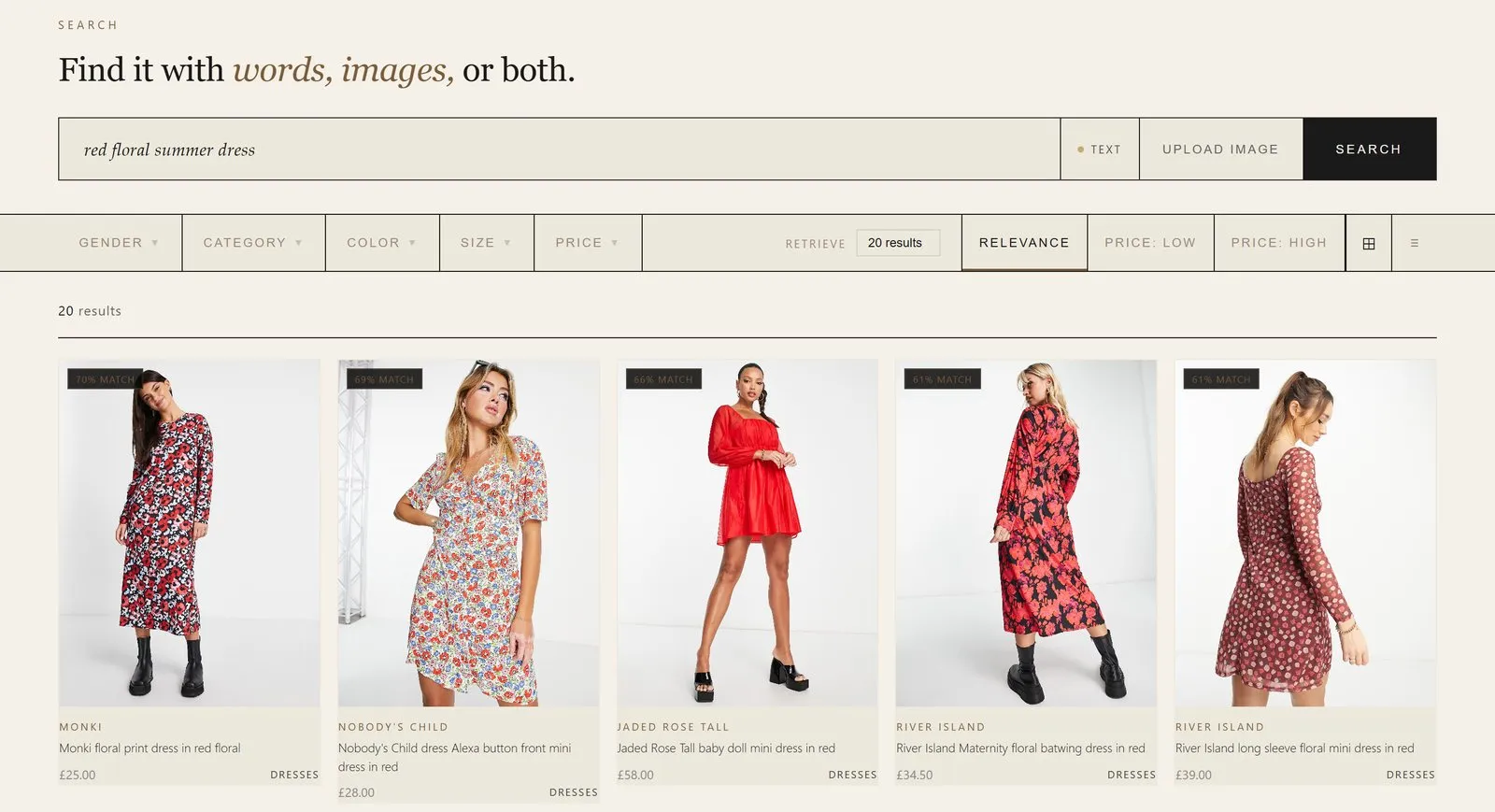
Interlace is the search engine I built to close that gap. It searches 29,971 real ASOS products by meaning instead of by matching words. You can describe what you want, upload a photo of it, or do both at once (“this jacket, but in green”). A full search takes 41 milliseconds on a laptop CPU. This post walks through how it works, the design decisions behind it, and how I measured whether it is any good.
Why keyword search fails at fashion
Classic search engines are built on an inverted index: a lookup table from each word to the documents that contain it. Ask for black skirt and the engine intersects the list for black with the list for skirt, then ranks the overlap with a formula such as BM25, which rewards rare words that appear often in a short document. It’s fast, predictable and very good when the shopper’s words are the catalog’s words.
Fashion breaks that assumption in four ways:
- Vocabulary mismatch. Crimson, scarlet and cherry are all red, but a catalog will usually spell red only one way.
- Vibe queries. Coastal chic and elevated casual describe a look, not a word that appears in any product title.
- Hard constraints hidden in text. Red dress under £50, not floral contains a category, a color, a budget and an exclusion. Treating it as a bag of five words throws away its structure.
- No words at all. A photo of a dress you liked can’t be typed into a search box.
The way around the first two is to stop comparing words and start comparing meanings. The way around the fourth is to compare meanings across text and images. Both depend on the same idea, which sits at the center of this project.
The catalog
A search engine can only find what its catalog contains, so the work began with the data: a public ASOS product dataset from Kaggle. Each product has 26 fields, including name, brand, price, color, materials, sizes in stock, style tags and image links. It covers 930 brands, with prices from £3 to £550 and a median of £32.
The raw data needed serious cleaning before any model could use it. The category field held
the product’s full name instead of a category, so I built a taxonomy from keyword rules. Almost
3,000 raw color names collapsed into a couple of dozen color families. Then every product’s
useful text (name, category, color, style tags, materials and details) was merged into a single
search_text field for the models to read.
Products by category29,971 products in total
Show as a table
| Item | Value |
|---|---|
| Dresses | 10,024 |
| Tops | 8,481 |
| Coats & jackets | 3,883 |
| Knitwear | 2,476 |
| Trousers | 1,717 |
| 13 other categories | 3,387 |
| Shoes | 3 |
Putting words and pictures in one space
The core idea is an embedding: a list of numbers (here, 512 of them) that places a piece of text or an image as a point in space, arranged so that similar meanings land close together. Once everything is a point, “find products like this query” becomes “find the nearest points”, which is pure geometry.
The model that makes this possible is CLIP, which OpenAI trained on 400 million image and caption pairs pulled from the web. CLIP has two encoders, one for text and one for images, and it was trained so that a photo and its caption land in the same place. The phrase a red floral dress and a photograph of one end up as neighbors, even though one is words and the other is pixels.
Interlace uses FashionCLIP, a version of CLIP fine-tuned on about 800,000 products from the retailer Farfetch. General CLIP knows what a dress is. FashionCLIP knows the difference between midi and maxi, bodycon and A-line, and that pillarbox is a shade of red.
Every embedding is scaled to length 1. With unit-length vectors, the dot product of two
embeddings equals their cosine similarity, so “how similar are these two things?” becomes a
single multiply-and-add over 512 numbers. Comparing a query against all 29,971 products is then
about 15 million multiplications, which a modern CPU finishes in a few milliseconds. To keep
it fast as catalogs grow, Interlace stores the vectors in FAISS, Meta’s similarity-search
library, using an IVFFlat index. It groups the products into 256 clusters during indexing,
then searches only the 20 clusters closest to each query. That trades a sliver of recall for a
large speed-up.
Two retrievers, two blind spots
With embeddings in hand, the obvious move is to throw away keyword search entirely. I measured that instead of assuming it, and the result is the most important finding in the project.
I wrote a benchmark that asks the same queries of three systems: BM25 alone, FashionCLIP alone, and the full Interlace pipeline. The score is precision@10, the share of the top ten results that have the category and color the query asked for. The queries come in two sets. The literal set uses the catalog’s own words (black skirt), one query for every category and color pair with at least 15 products, 89 in all. The paraphrased set uses words the catalog rarely uses (crimson evening gown, cobalt puffer), 15 in all.
Literal queries, like “black skirt”Precision@10, 89 queries
Show as a table
| Item | Value |
|---|---|
| BM25 only | 0.88 |
| FashionCLIP only | 0.73 |
| Full pipeline | 1.00 |
Paraphrased queries, like “crimson evening gown”Precision@10, 15 queries
Show as a table
| Item | Value |
|---|---|
| BM25 only | 0.40 |
| FashionCLIP only | 0.64 |
| Full pipeline | 0.78 |
When the words match, keyword search beats the neural model, 0.88 to 0.73. Embeddings are fuzzy by design, and fuzziness costs you when the query is already precise. Change the words and the order flips: BM25 collapses to 0.40, because crimson and frock barely occur in the catalog, while FashionCLIP still places them near red dresses and scores 0.64.
Keywords and embeddings fail in opposite places. That is the whole argument for a hybrid engine, and it is why Interlace keeps both.
Fusing rankings without comparing scores
Combining retrievers raises a subtle problem. A BM25 score of 14.2 and a cosine similarity of 0.31 aren’t on the same scale, and adding them would be meaningless. The same is true of two embedding indexes searched with different prompts.
Interlace sidesteps the problem with Reciprocal Rank Fusion (RRF), which ignores the scores entirely and looks only at each product’s position in each list:
score(product) = 0.55 / (60 + rank in index A)
               + 0.45 / (60 + rank in index B)
The constant 60 flattens the curve, so being first instead of fifth matters, but not overwhelmingly. A small example (invented ranks, real formula) shows the effect:
| Product | Rank in A | Rank in B | RRF score |
|---|---|---|---|
| B: good in both | 5 | 3 | 0.01560 |
| A: first in one, mediocre in the other | 1 | 40 | 0.01352 |
| C: strong in B only | not in top 900 | 2 | 0.00726 |
Product B never ranks first anywhere, yet it wins. RRF rewards agreement between retrievers over one retriever’s enthusiasm, which is exactly the behavior you want when each retriever has its own blind spots. Each index returns its 900 nearest neighbors, and the 300 best fused candidates move on.
From a sentence to a ranked page
Retrieval is only the middle of the story. Before any vector math, the engine reads the query for structure. Afterwards, it filters and reranks what came back.
The query pipeline, in the order the code runs it
Understand
- Translatefashion dictionary for French, Spanish, German and Italian
- Spell-correcttrained on the catalog’s own vocabulary
- Parse intentcategory, color, price, size, material, “not X”
- Embedaverage of 5 prompt phrasings
Retrieve
- Search two FAISS indexes900 neighbors each
- Fuse with RRF300 candidates survive
Refine
- Apply filtersrelax step by step if nothing survives
- Reranksimilarity, style tags, BM25, stock
- Return the top resultssorted as the shopper chose
A few of these steps deserve a closer look.
Spell correction from the catalog itself. The corrector follows Peter Norvig’s classic design: generate every string within one or two edits of an unknown word, then pick the one that appears most often in a reference vocabulary. Training that vocabulary on the catalog, rather than a general dictionary, means it knows fashion words. Bodyconn becomes bodycon, not bacon.

Prompt ensembling. CLIP is sensitive to phrasing. Red dress and a photo of a red dress land in slightly different places. So the query is embedded five times, in five phrasings such as a product photo of {query} and an e-commerce photo of {query}, and the five vectors are averaged. The average sits near the center of what the query could mean, which makes results steadier when the shopper rewords it.
Intent parsing. Embeddings are poor at hard constraints. Under £40 is a rule, not a mood, and a vector has no way to say “nothing above £40”. So a rule-based parser pulls the category, color, gender, price range, size, material and exclusions such as not floral out of the text and turns them into exact filters.
Reranking. The surviving candidates are scored by a weighted blend: 55% fused similarity, 25% overlap with the query’s style tags, 15% BM25 and 5% for being in stock. When the query names a budget, a fifth signal joins in. Price proximity is a bell curve centered on the target price, so a £38 dress beats a £12 one for dress under £40. Someone who names a budget is telling you roughly what they expect to spend, and the results should stay near it.
Never show an empty page
Strict constraints on a finite catalog often leave nothing. Interlace treats an empty page as a failure and relaxes constraints the shopper typed, one at a time, in a fixed order: size and material first, then color, gender and stock, then the price cap in steps of ×1.5, ×2, ×3 and ×5, and the category last. Widening the budget in steps keeps the cheapest workable items on top, instead of jumping straight to £200 items for under £10.
“floral dress blue under 30”
Filters the shopper clicks are treated differently. They are never relaxed, because someone who ticks “size 8” means it. They are also applied before retrieval, not after. A 300-item candidate pool works well for open-ended queries, but a strict combination of gender, category, color and size might match products that simply aren’t among the 300 nearest. So when the shopper sets filters, the engine filters the whole catalog first and ranks that subset exactly. With 30,000 vectors, an exact pass over the filtered subset still takes only milliseconds.
Searching with a photo
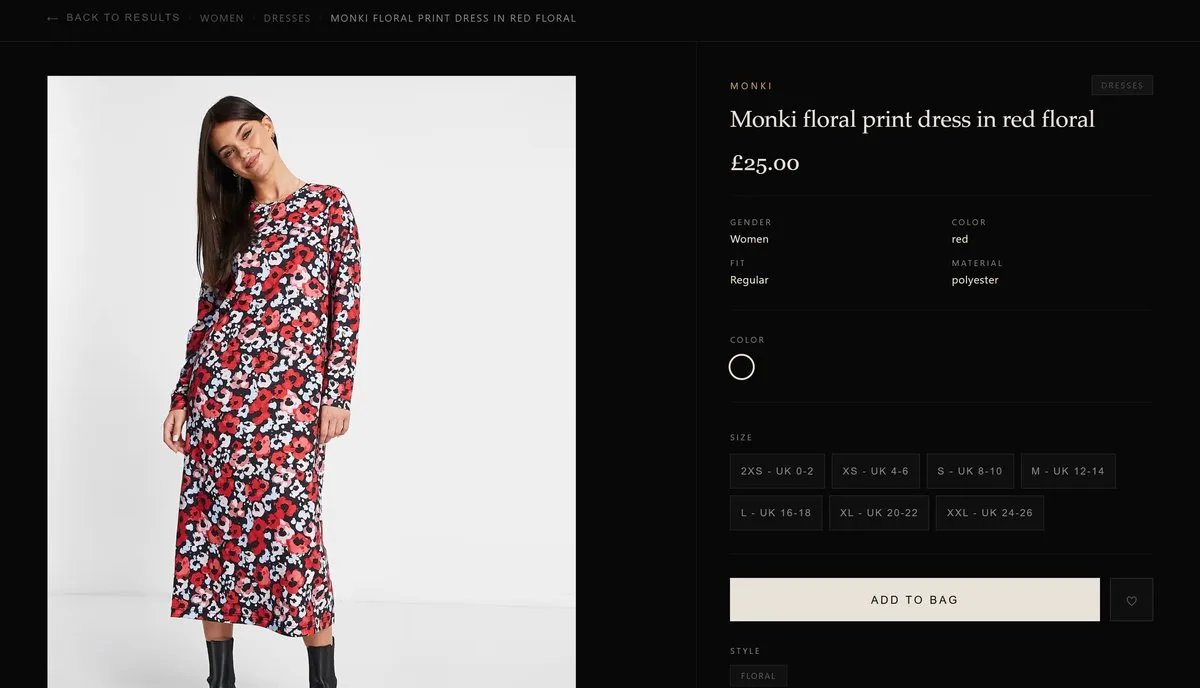
Upload a photo and it goes through FashionCLIP’s image encoder, landing in the same space as every product’s text. The engine then runs the same fused search. You can add text as well, and the two embeddings are blended by a weight the caller chooses. That’s how “this jacket, but in green” works.
There is a twist here that I find genuinely elegant. Neither FAISS index contains a single photo embedding. Both are built from product text: one wraps each description as a fashion product: … and the other as a fashion product photo of …. Downloading and encoding 30,000 product photos was out of scope for the first version, so photo search depends entirely on CLIP’s shared space carrying a picture across to a description.
To find out whether that works, I sampled 200 products at random, fed each one’s catalog photo in as the query, and checked where the product itself appeared in the results.
Photo in, product out200 random products, each searched with its own catalog photo
Show as a table
| Item | Value |
|---|---|
| Exact product in top 1 | 18% |
| Exact product in top 10 | 48% |
| Top 10 share its category | 62% |
| Top 10 share its color | 65% |
From one photo, the engine finds the exact item among nearly 30,000 in its top ten results about half the time, against a random-chance rate of 0.03%. And when it misses, its neighbors still share the category and color far above chance. All of that comes from a model matching pixels to prose it has never seen paired together.

How I know it works
Search quality is notoriously hard to measure. This catalog has no human relevance labels, so nobody has said which products are good answers to crimson evening gown. I had two choices: skip measurement, or define a narrower question I could answer honestly.
I chose the second. The benchmark asks: do the results have the category and color the query asked for? The labels come from the catalog’s own metadata. That says nothing about style, fit or whether a shopper would like the item, so I treat the scores as a way to compare retrieval methods and catch regressions, not as a grade for search quality. Being clear about what a number measures is half of what makes it useful.
The benchmark paid for itself on its first run. The paraphrased set scored 0.71, and two queries scored zero. One was charcoal wool coat. The parser mapped charcoal to black, but the catalog files its 129 charcoal products under grey, so the engine applied an exact filter that hid every coat the shopper meant. Checking every color synonym in the parser against the catalog’s own color rules turned up three more mismatches (camel, teal and coral) and 13 common catalog color words the parser ignored, such as stone, ecru and wine. Aligning the two lifted the score to 0.78.
That bug is a good illustration of how search systems fail in practice. The model was fine. A one-line dictionary entry, sitting upstream of the model, quietly decided what the model was allowed to return. Without a benchmark the bug would have been invisible, because the engine still returned plausible black coats.
I hold one caveat about that jump: I found the bug with the same 15 queries that measured the fix, so 0.78 is likely a little optimistic. A fresh held-out query set is the honest next measurement.
Speed is easier to state. A full text search takes 41 ms at the median and 44 ms at the 95th percentile, on an Intel Core i9-14900HX laptop CPU with no GPU, with the model already loaded.
Building it to run, not just to demo
The engine began life as a single 2,789-line notebook script that held everything: encoder, indexes, parser, spell checker, reranker and evaluator. It worked, but nobody else could use it. Turning it into a product meant splitting it into modules with one job each, wrapping them in a FastAPI service, and building a Next.js storefront on top. A few engineering decisions shaped the result.
FAISS in memory instead of a vector database. The whole index is 30,000 × 512 floating-point numbers, about 61 MB. A hosted vector database would add a network hop, a bill and a new way to fail, all for a dataset that fits comfortably in RAM. The cost is that the index is static: adding products means rebuilding it and redeploying. For a fixed catalog, that’s the right trade.
A regex parser instead of a neural one. Rules are deterministic, testable and need no extra model download. The price is brittleness, since a phrasing nobody wrote a rule for slips through. For constraints that must be exact, like a budget, I would rather have a rule I can test than a model I have to trust.
Hosting that costs nothing. The backend runs in Docker on a free Hugging Face Space, and the storefront on Vercel. The engine loads in a background thread at startup, so the health check can honestly report loading instead of timing out. The free Space sleeps after two idle days, and the first search after that can take a few minutes while it wakes.
Tests that guard the behavior. The backend has 134 automated tests, including regression suites written to fail on the old code before each fix, plus a smoke test against the real engine. Every pull request and every push to main runs them in GitHub Actions, alongside the frontend’s lint, type check and build.
What comes next
Interlace does what it set out to do, and the benchmark shows exactly where the next gains are.
- Embed the real product photos. Today’s “image” index is built from text, and the benchmark shows it performs about the same as the plain text index. A true visual index is the change most likely to lift photo search above 48%.
- A held-out query set with human judgments. Category-and-color labels were the right first benchmark. The next one should ask people which results they would actually click.
- Protect the words the parser understands. The spell corrector learned its vocabulary from product text, which doesn’t contain cheap. A Spanish query for a cheap red dress gets translated correctly, then “corrected” to cheat, which matches the brand Style Cheat and drops the budget. The fix is to exempt the parser’s own keywords from correction.
- Broader parser coverage. Wine coloured knit still misses, because knit on its own doesn’t trigger the Knitwear category. Every phrase like that is a one-line rule and a test.
- A wider catalog. With three pairs of shoes and 153 menswear items, some queries can’t be answered well by any algorithm. More data would help more than more modeling.
What this project taught me
Measure before you believe. I expected the neural model to beat keyword search everywhere. It loses on literal queries, and that single chart changed the design of the whole engine.
The cheap stages decide everything. The spell corrector and the regexes are the least impressive code in the project, and they control what the expensive model ever sees. The charcoal bug lived in a dictionary, not in a neural network.
Combine methods that fail differently. Keywords and embeddings have opposite blind spots, and rank fusion lets them cover for each other without any hand calibration of their scores.
Say exactly what a number means. A precision score with a clear definition and an honest caveat is worth more than an impressive one that nobody can interpret.
The live demo is open to anyone, and the source code, benchmark and design notes are on GitHub. Try crimson evening gown, or upload a photo of something you own and see what it finds.